


Start with factual team updates
Put owners and status in the notes before asking for a report. Keep a discovered problem separate from the work of fixing it, and name whatever a blocked task is waiting for.
This test used five fictional updates: Alex finished the registration form; Sam tested 12 sign-ups and found 2 duplicate entries; Pat drafted the agenda; venue confirmation was blocked while waiting for a quote; and Alex would review the duplicates next week.
We selected Weekly Report under Skills in the Orlino desktop app; the task carried the @weekly-report entry. We asked for a one-page English Word file that separated completed work, blockers and named next steps, with no invented dates, causes or extra owners.
Nothing in the notes said the duplicates had been fixed or the venue confirmed.
Separate completed work, blockers and next steps
The returned weekly-report-en.docx used four sections: Completed This Week, In Progress, Next Week and Needs Decision.
Completed This Week listed Alex's finished form, Sam's testing and Pat's agenda draft. It kept the 12 tested sign-ups and 2 duplicates found, with duplicate review left as future work.
In Progress kept the venue blocker visible. Next Week assigned Alex to review the 2 duplicate entries, leaving that review unfinished and the venue without an invented owner.
The Needs Decision section went further, saying no decision could be made until the quote arrived. The source only said venue confirmation was blocked. After a separate v2 request changed the duplicate-review owner from Alex to Sam, we asked for that venue sentence to be narrowed. The resulting weekly-report-en-v3.docx read, “Venue confirmation remains pending while the quote is outstanding.” Comparing v3 with v2 confirmed that only the venue paragraph changed; the Sam assignment stayed.
Put the idea to work.
Try the workflow with your own material in Orlino.
Check the generated Word report
We opened the Word file beside the conversation and compared it with the original updates without switching applications.
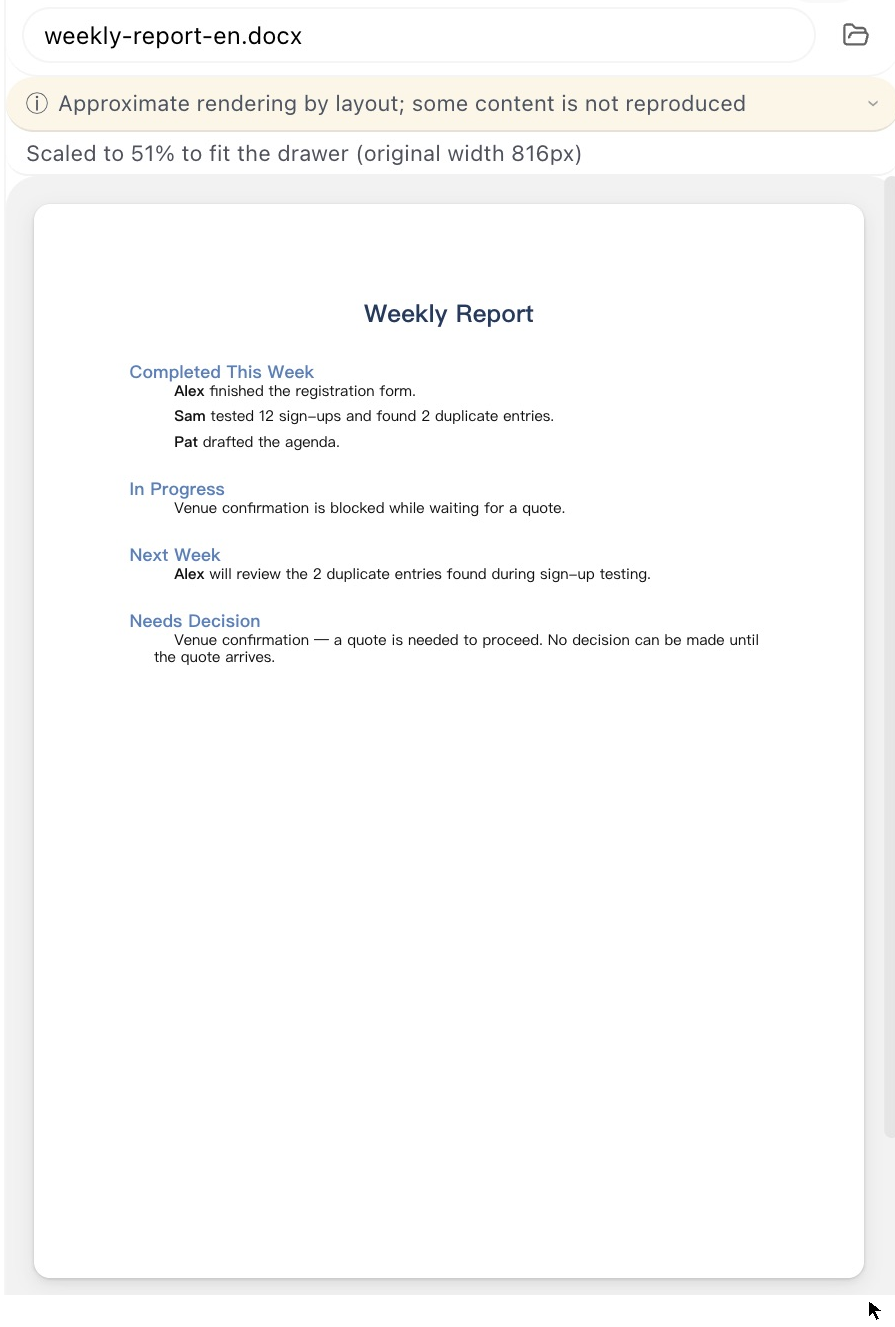
The viewer described the layout as approximate and warned that some content was not reproduced. It was useful for an initial read, but could not confirm how the export would paginate elsewhere.
We rendered the export separately. All four sections fit on one readable page without clipping. The extracted text was entirely English and preserved the names, counts and blocked venue status.
A prompt for your weekly notes
This suggested prompt is adapted from the test. Replace the fictional updates with your own after selecting the skill.
@weekly-report
Create a one-page weekly report in English from these fictional updates:

- Alex finished the registration form.
- Sam tested 12 sign-ups and found 2 duplicate entries.
- Pat drafted the agenda.
- Venue confirmation is blocked while waiting for a quote.
- Next week, Alex will review the duplicates.

Separate completed work, work in progress, next steps and items needing a decision. Preserve names, counts and status. Keep the venue blocker visible. Do not invent dates, owners, causes or completion claims. Do not expand a specific blocker into a general decision rule.

Return weekly-report-en.docx. Report which checks you performed.
Review before sending
Before sending the report, read it against the original updates:
- Are completed tasks separate from future work?
- Do the owners and counts match the source?
- Can the reader find every blocker and its missing dependency?
- Have any headings encouraged the draft to invent a decision or commitment?
- Does the exported page remain readable?
The guide to AI long-document report writing covers a longer source-based draft. The project-notes-to-files walkthrough follows a set of meeting outputs.
You can use Weekly Report in Orlino with a few factual updates. Before sharing the file, check that its owners and statuses still match the notes.
About this article
Published by Orlino, based on recorded product tests using fictional or supplied sample material. The results and limits described apply to those tests; features and model availability may vary by build and account. Screenshots are cropped to remove unrelated account details; retained text is unchanged. See our editorial process.
Try your next task in Orlino.
Bring your notes, files, and questions to Orlino. Choose the app for your device.