


Claude Fable 5.2 pricing starts with the billing route you use. Direct API token charges, a Claude application subscription, and access through another workspace describe different purchases. For an API estimate, identify the model, processing mode, billable usage, and any additional operations before applying a rate.
This guide explains how to turn the published rates into a practical budget. The calculations are hypothetical examples, not measured costs from a customer workload. Rates were checked on November 11, 2026; confirm the terms that apply when you run the work.
For specifications and access considerations, see the Fable 5.2 model guide.
The published Fable 5.2 API rates
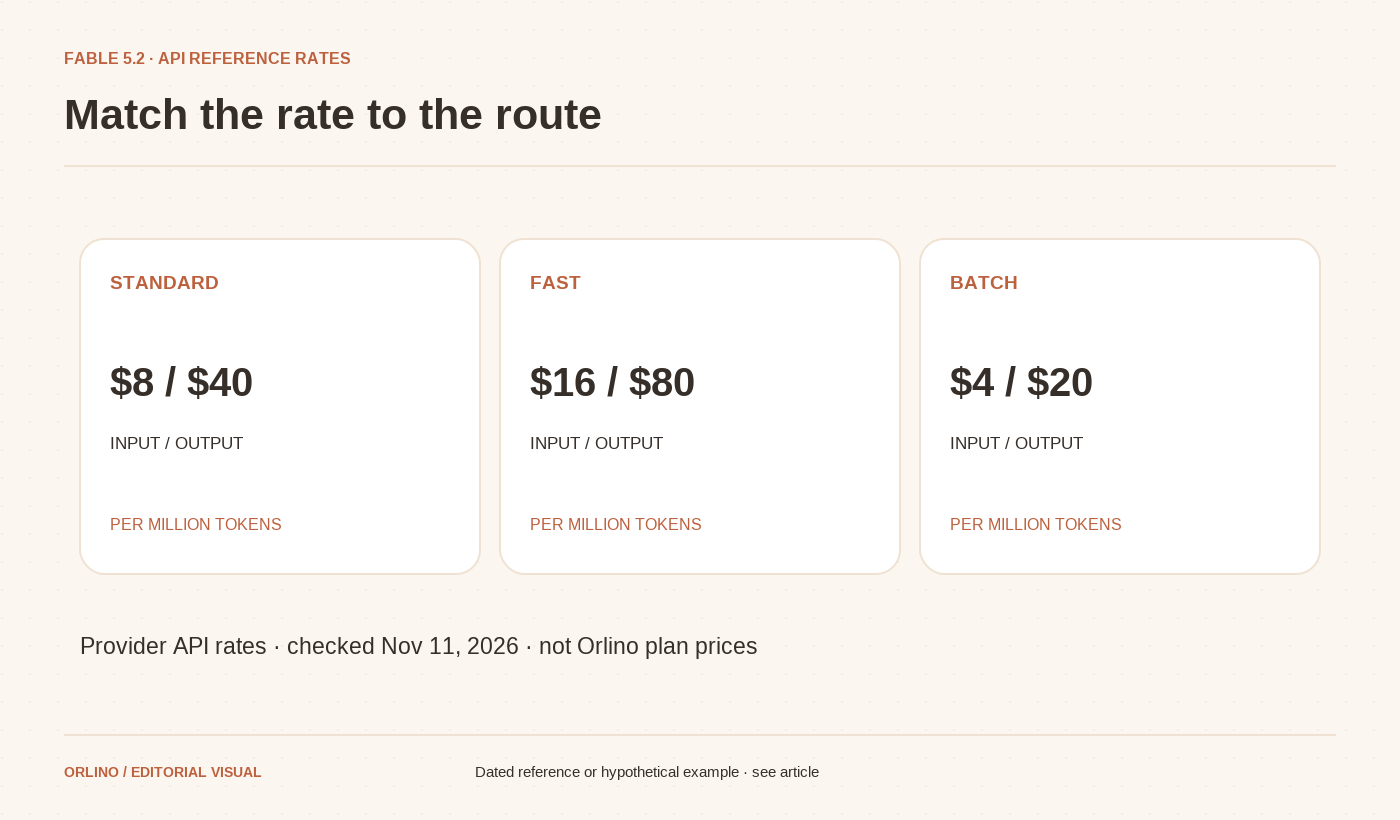
Anthropic's API pricing reference lists the following USD rates per million tokens. These are provider rates, not Orlino plan prices.
| Processing or cache operation | Input or write | Output or read |
|---|---|---|
| Standard processing | $8 input | $40 output |
| Fast mode | $16 input | $80 output |
| Batch processing | $4 input | $20 output |
| Five-minute cache write | $10 write | Check subsequent read usage |
| One-hour cache write | $16 write | Check subsequent read usage |
| Cache hit under standard pricing | See cache write separately | $0.20 read |
The rows represent different operations rather than a menu of interchangeable discounts. A cached input request still has other billable components, and fast mode has separate compatibility and modifier rules. Use the provider documentation to establish the applicable combination.
A basic standard-processing calculation
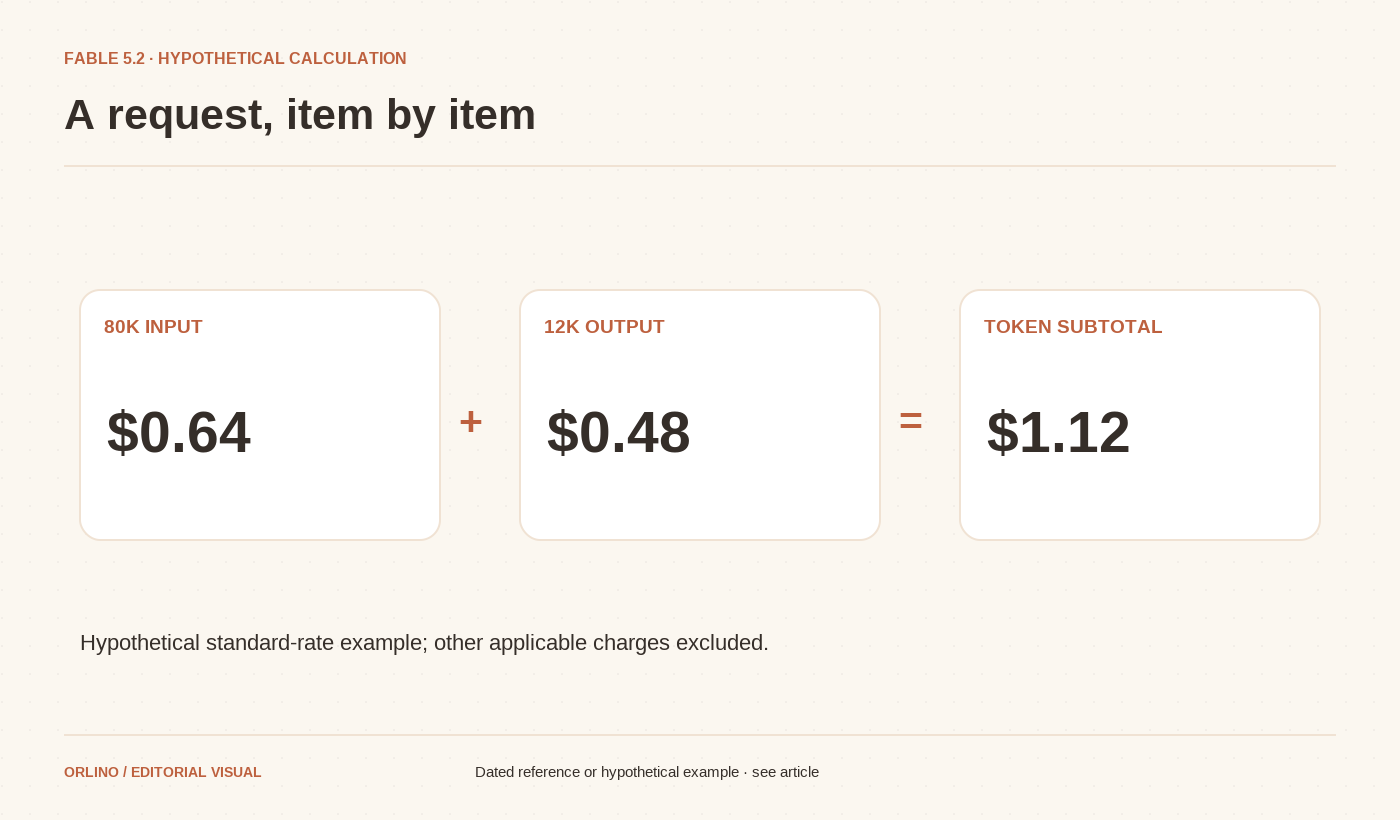
For an illustrative request with 80,000 standard input tokens and 12,000 billable output tokens, the arithmetic is:
Input: 80,000 / 1,000,000 × $8 = $0.64
Output: 12,000 / 1,000,000 × $40 = $0.48
Illustrative token charge: $1.12
This example excludes caching, tools, taxes, special processing options, and other adjustments. It also assumes that the usage quantities are already known. A prompt describing a task cannot reliably tell you the final billable usage in advance.
For budgeting, begin with a small representative run and inspect its usage record. Keep the request configuration with the observation so the number remains meaningful later. If you change the material, output format, or workflow, measure the affected workload again.
Why output length deserves attention
An analysis can be expensive even when its final visible answer is concise. Read the applicable accounting rules and usage fields instead of estimating the bill from the number of words displayed to the user.
Control the deliverable with a clear format. A request for a patch, a short verification report, and unresolved issues is easier to budget than an open-ended demand to document every possible improvement. Extra explanation is useful when it supports a decision; it should have a purpose.
Keep complete artifacts outside repeated conversation turns when your application supports that workflow. Otherwise, a growing exchange may repeatedly carry material that is no longer relevant to the next step. Measure the actual effect rather than assuming a shorter-looking prompt always reduces charges.
For multi-session assignments, the Fable 5.2 checkpoint workflow helps connect repeated requests with completed work.
Standard mode versus fast mode
Fast mode changes the economic decision when waiting time matters. At the rates above, the same illustrative 80,000-input and 12,000-output quantities would produce $2.24 in token charges before other adjustments. That is an arithmetic comparison using fixed quantities, not a prediction that the modes consume identical resources.
Ask which milestone needs to be faster. A live coding session may benefit from a shorter wait for useful output. An overnight report may tolerate a longer turnaround. Put the latency requirement next to the price comparison so a premium is judged against an actual need.
When comparing modes, record the time to an accepted result. A quicker first response that requires extra correction may offer less value than the initial timing suggests. Review quality and elapsed time separately before combining them into a business decision.
Prompt caching: identify the repeated input first
Caching is relevant when a workflow repeatedly uses compatible input material under the provider's rules. Examples might include a stable instruction packet or unchanged reference content. Whether a specific request produces a cache hit must be established from its configuration and usage record.
Do not assume that every token in a repeated task is eligible or cached. Separate the portion written to the cache, the portion read from it, and fresh input. Then add output and any other charges. Keep cache duration and changes to the input in the record.
A useful logging table has one row per request with columns for fresh input, cache writes, cache reads, output, processing mode, and separately billed operations. That structure makes it possible to explain why two apparently similar runs produced different bills.
An illustrative cache-read calculation
Suppose a subsequent standard-mode request reports 60,000 eligible cache-read tokens, 20,000 fresh input tokens, and 8,000 output tokens. Under the listed standard rates, its illustrated components are:
Cache read: 60,000 / 1,000,000 × $0.20 = $0.012
Fresh input: 20,000 / 1,000,000 × $8 = $0.16
Output: 8,000 / 1,000,000 × $40 = $0.32
This request's illustrated subtotal: $0.492
The cache was not created for free: a complete workflow estimate must include the earlier write and any other requests. A cheap read in isolation does not establish the overall savings. Compare the complete sequence with a suitable uncached baseline.
A Fable 5.2 data-analysis workflow provides an example of an accepted deliverable whose calculations can be checked.
When batch processing is worth investigating
Batch processing can suit work that does not require an immediate interactive response. Examples include independently reviewing a set of documents or preparing drafts that will be inspected later. Check deadlines, supported features, and operational requirements before choosing it.
Anthropic's pricing documentation describes discounted batch input and output rates and notes that fast mode is not available with the Batch API. Those are distinct processing choices with different constraints, not discounts to add together automatically. The current pricing details explain the combinations.
For a batch workflow, keep request identifiers and item-level outcomes. An aggregate success message should not hide failed items or drafts that need another run. Include those follow-up costs when comparing the approach with standard processing.
Build a task budget that includes retries
A task can involve planning, tool use, revisions, and a final artifact. Add all of the requests required to produce the accepted result. Keep abandoned attempts in the record, since they still matter to the operating budget.
For a pilot, group work into a few meaningful categories: a straightforward task, a typical task, and a difficult investigation. Measure representative examples in each category. Use the observed variation to identify where a budget ceiling or a review checkpoint would help.
Avoid turning one unusually cheap or expensive request into the assumed average for all work. A useful estimate explains the source material, requested output, configuration, and conditions behind the observation. That description also shows when the estimate needs refreshing.
Include human review without hiding assumptions
Keep API charges and reviewer time in separate columns. You can calculate a combined cost after choosing an explicit hourly assumption, but the calculation should show that assumption. Different teams may value waiting time and review time differently.
Record the corrections the reviewer actually made. A result that needs minor formatting changes is different from one requiring a new analysis. This helps you distinguish a pricing problem from a task-design or quality problem.
If a cheaper model already meets the requirement, compare the complete workflows before upgrading routine tasks. The related Fable 5.2 versus Opus 5.5 guide provides a method for making that decision with a representative assignment.
Keep app subscriptions and API billing separate
A consumer plan may provide an interface, tools, and usage allowances under its own terms. An API project can charge according to measured usage and the selected processing options. Another application can package access differently again.
Before purchasing, write down which product provides the exact model, which environment runs the tools, and which account receives the charges. Confirm the version and allowances in that account rather than inferring them from a model-family name.
The Fable 5.2 model guide is useful for the capabilities question. This pricing article addresses how to measure and estimate a particular access route, not whether every application exposes the same features.
Use a practical monthly budget worksheet
A simple planning worksheet can list task category, expected monthly task count, observed usage range, acceptance rate, and follow-up work. Keep estimates distinguishable from measured values. Record the date and applicable rates with every pricing assumption.
Create an alert or operating review for workloads that exceed the assumptions of the pilot. Check whether the change came from larger inputs, more revisions, different output requirements, or a configuration change. Each cause suggests a different response.
Refresh the worksheet when the workflow or terms change. A budget is most useful when someone can trace it back to the actual request records and understand what would make it inaccurate.
Conclusion
Fable 5.2 API pricing is easier to evaluate when you separate the bill into operations and measure the full task. Start with the applicable input and output rates, add cache and tool components where relevant, and include retries and incomplete items. Compare standard, fast, and batch processing against the timing and quality requirements of the work.
Keep the access route explicit. A Claude subscription, a provider API project, and a multi-model workspace can offer different tools and billing terms. Use a representative pilot to turn the published rates into a budget you can explain, update, and compare with other approaches.
FAQ
Is Fable 5.2 free to use through the API?
The published API rates describe paid usage. Credits or account-specific offers, if available, have their own conditions and should be checked directly. Do not assume that free access in an application means an unrelated API project has a free allowance.
What is the standard Fable 5.2 API price?
The provider rates checked for this guide are $8 per million input tokens and $40 per million output tokens. The final charge depends on usage and applicable processing conditions. Check the current official pricing before using these figures for a live budget.
Does a cache hit make the whole request nearly free?
A cache read is only one component. Fresh input, output, earlier cache writes, and other billable operations can still apply. Compare the full sequence of requests to understand the effect of caching on the task rather than quoting one low read charge.
Can I combine fast mode and batch discounts?
The current provider documentation states that fast mode is not available with the Batch API. Check supported combinations instead of adding separate pricing rows together. Other modifiers may have their own rules and should be evaluated for the actual processing route.
How many tokens will my task use?
Measure a representative run with the intended material, tools, and output requirements. Word count alone cannot reliably establish final billable usage. Keep the configuration with the usage record and revisit the estimate after significant workflow changes.
Should reviewer time count in the comparison?
Yes, when it affects the operating decision, but record it separately from the API bill. If you combine the two, state the value assigned to the time. That keeps a business assumption from being mistaken for a provider charge.
Do these prices describe Orlino subscriptions?
No. They are provider API reference rates. Check Orlino's current model listing, plan terms, and usage allowances independently. An application may package access and tools in a way that cannot be compared using a single API token rate.